Clean once. Reuse the flow.
Save a visual workflow for the next client export or monthly report. Keep each transformation visible and editable.
Free Windows beta · 1.0.5-beta.2
Clean and combine CSV and Excel files in a visual desktop workspace. Save your steps, review the result, and run the same flow next time—all on your computer.
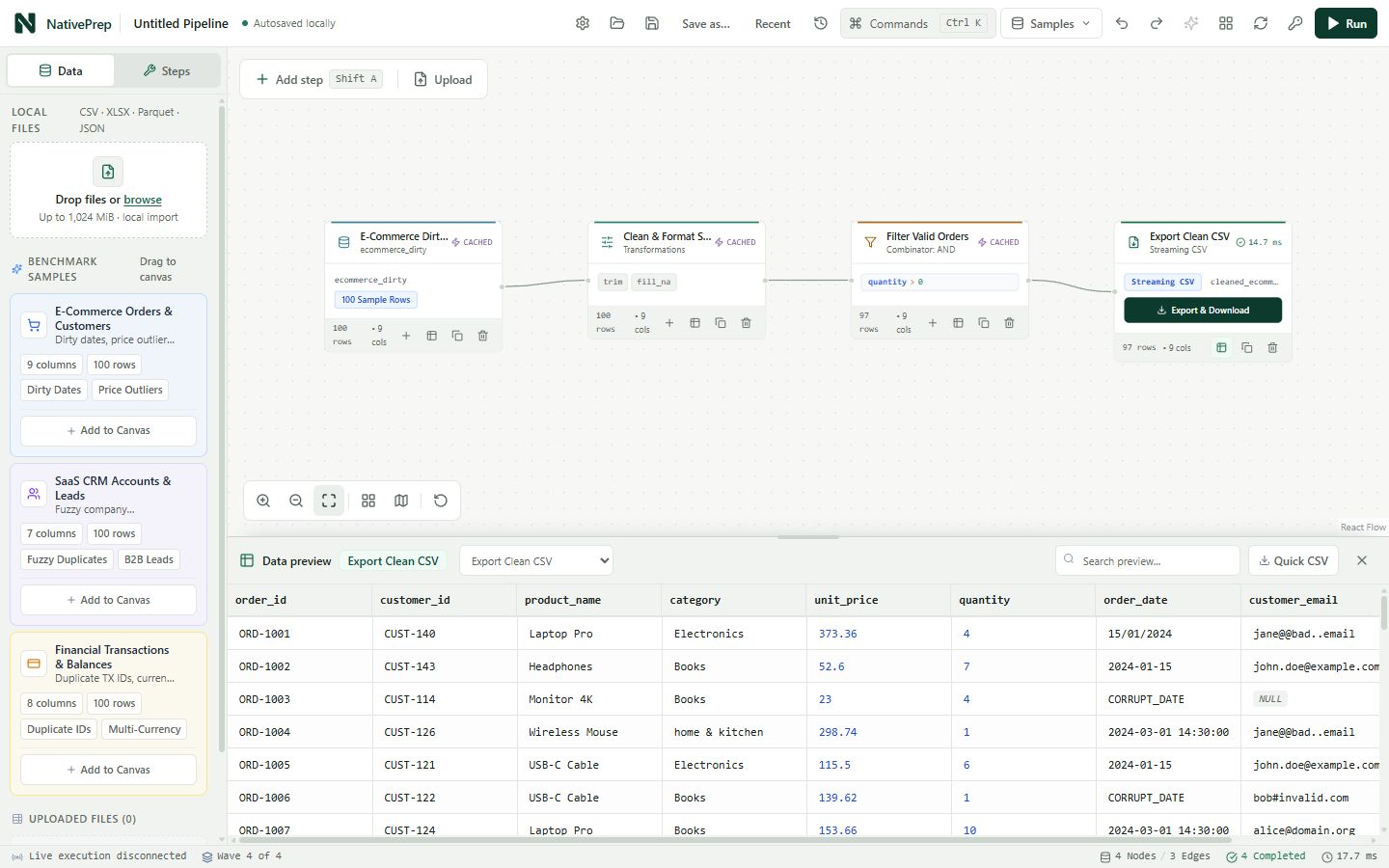
Save a visual workflow for the next client export or monthly report. Keep each transformation visible and editable.
Inspect rows, column types, and profiles as you clean, filter, join, and reshape your files.
Import, processing, and exports run locally by default. External AI is optional and disabled by default.
From file to finished output
Bring in CSV, Excel (.xlsx), Parquet, or JSON. Start with built-in samples to explore first.
Connect cleaning, filtering, joining, and aggregation steps. Inspect the data as you work.
Export the prepared result and save your project. Relink source files when the next batch arrives.
Help shape NativePrep
This beta is free. We’re looking for analysts and small teams who regularly prepare files for reports. Tell us what worked, what was confusing, and what stopped you.
NativePrep’s default workflow does not upload source datasets to a hosted service. Optional external AI requires a separate opt-in. This website serves product information and downloads; the desktop app does the data work.